llms.txt generator and AI bot access test for your website
Enter your website address and within 20 seconds at most you get the whole llms.txt file built from your sitemap and an access test for 8 AI bots. No sign-up, no email.
Short answer
llms.txt is a Markdown file in the root of a website that points language models to its most important pages, each with a short description. It is a proposed standard (llmstxt.org), not a requirement: according to Ahrefs, no major model provider officially supports it. For ChatGPT, what matters more is whether AI bots can access your site in robots.txt. The generator checks both.
What you get for free
Right away, no email and no sign-up
- The whole llms.txt file in the llmstxt.org format: a heading with the name, a business description and sections with links to your pages.
- A title for every link and a description from the page’s meta description, if it has one.
- Sections by folder and language version, with terms and policies in the "Optional" section.
- An editor before downloading: untick lines, change titles, descriptions, order and sections.
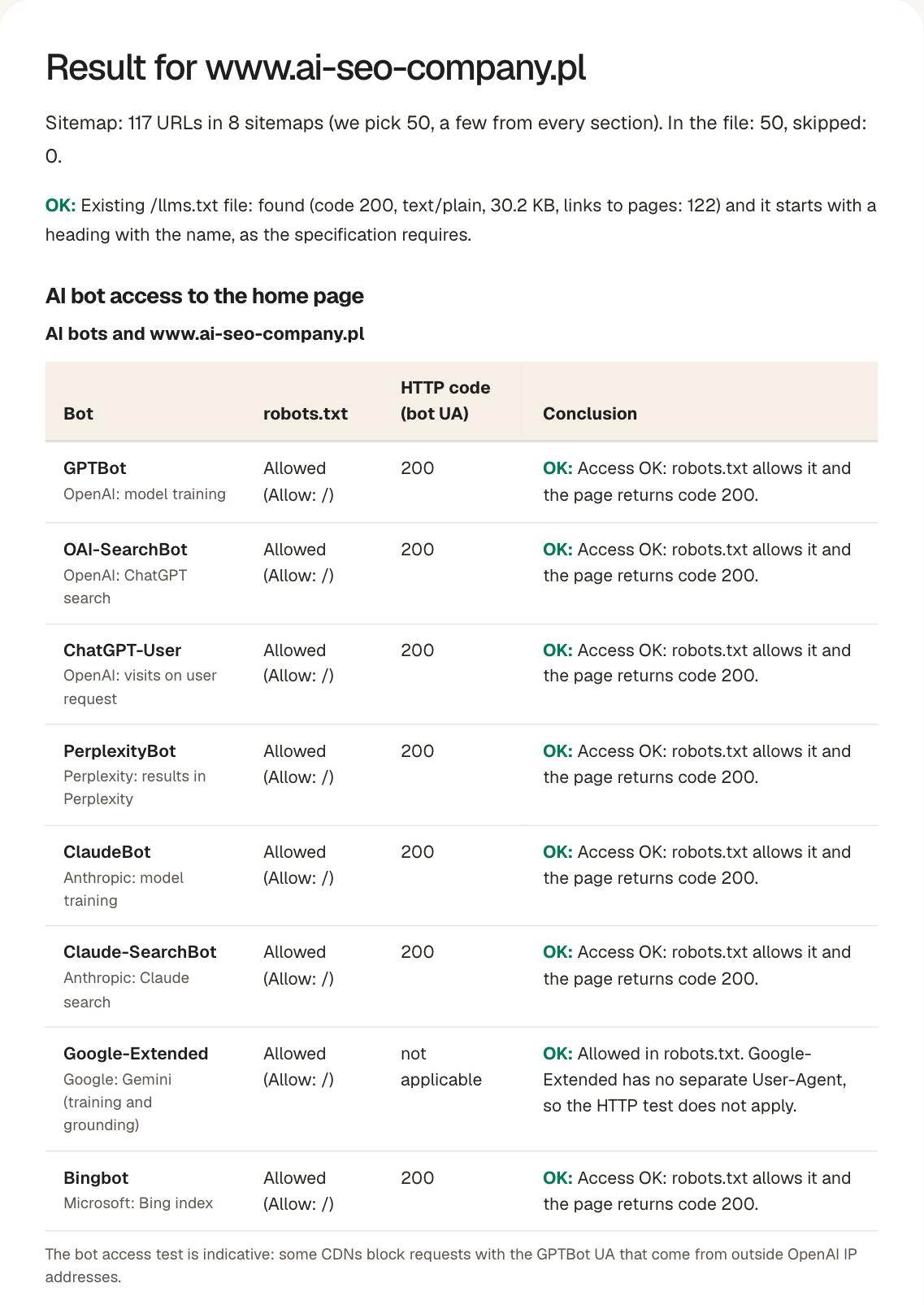
- A robots.txt and HTTP code test for 8 AI bots, with a conclusion for each.
- A check of the existing /llms.txt file, including its number of links to your pages.
- A list of skipped URLs with the reason (HTTP code, noindex) and a link to the result you can copy.
There is nothing to unlock with an email: the whole result is on the page. We do not store the address or the result.
What is llms.txt (and llms-full.txt)
The llms.txt file lives at /llms.txt and describes a website for language models and AI agents that read pages on behalf of users. Jeremy Howard proposed the format in September 2024, and the current version of the specification (v2) is published at llmstxt.org.
The layout is fixed. At the top is a heading with the company name, the only required element. Below it comes a blockquote with a short description, followed by sections with lists of links: the page title in square brackets, the URL in parentheses and, after a colon, a sentence about what is there. A section named "Optional" holds secondary links that a model may skip when it is short on context. This is what the beginning of our llms.txt file looks like:
# AI SEO COMPANY

> Agencja SEO i web design z Warszawy. Pozycjonowanie stron, pozycjonowanie
> w AI (GEO), audyty SEO, SEO lokalne i projektowanie stron dla małych
> i średnich firm. Każdy klient dostaje panel klienta 24/7 z publicznym demo.

## Zmiana agencji

- [Zmiana agencji SEO bez kar i utraty pozycji](https://www.ai-seo-company.pl/zmiana-agencji-seo): poradnik, checklista 32 punktów (konta Google, domena, treści, linki, dane) i bezpłatny przegląd po poprzedniej agencji (30 min).
An excerpt of https://www.ai-seo-company.pl/llms.txt as of November 5, 2026 (the file itself is in Polish).
Some sites also publish a second, much longer file called llms-full.txt. Our generator creates the index, that is llms.txt: it is what a typical company website needs.
Does llms.txt help in Google and ChatGPT?
There is no evidence for it so far. Ahrefs (accessed November 5, 2026) found no statement from OpenAI, Anthropic or Google that their crawlers read this file. Even so, 28% of the 137,000 domains that Ahrefs studied in its Web Analytics tool publish llms.txt. Companies roll it out in advance, hoping that models will start to use it.
Signals from Google are mixed. The Chrome team added an llms.txt check to its experimental Lighthouse audits, while Google's John Mueller explained that the file was not created with search in mind. Gemini's access to content is governed separately, by the Google-Extended entry in robots.txt.
Our conclusion: llms.txt is a cheap add-on, not a strategy. Preparing the file costs little and breaks nothing, but whether ChatGPT, Perplexity or Claude cite your site is decided by their bots' access and by content that can be quoted. That is why the generator also tests robots.txt and server responses for 8 bots. If you care about recommendations in model answers, start with AI search optimization and read how to get ranked in ChatGPT.
What the generator checks
The generator fetches your sitemap, picks up to 50 URLs (with a larger sitemap, a few from every section), checks them and builds the file from them. At the same time it tests the access of 8 bots to the home page. The whole run takes 20 seconds at most. If your site responds slowly, you get a partial result and a list of the URLs we did not manage to check. We do not store the address or the result.
| Test | Why | How to read the result |
|---|---|---|
| Sitemap | Source of the page list: the Sitemap entry in robots.txt or /sitemap.xml, including sitemap indexes (up to 20 child sitemaps). With more than 50 URLs, we take a few from every sitemap and section, not the first 50. We replace a few URLs with errors with others from the same section. | Without a sitemap, the file contains only the home page. Add sitemap.xml and submit it in Search Console. |
| Response code and redirects | Only URLs that return code 200 go into the file. | URLs with 3xx, 4xx and 5xx codes appear on the skipped list together with the code. |
| noindex | A page excluded from the index should not appear in the listing. | We skip URLs with noindex in the meta robots tag or in the X-Robots-Tag header. |
| Title and description | They make up the lines of the file: a link with a title and a description after the colon. | No description = a bare link. Add a meta description to those pages. |
| File sections | We group pages by the first part of the URL (Blog, Services) and by language version (EN version, Blog (EN)). Terms and policies go to the "Optional" section, which a model may skip. The contact page stays in "Pages". | A section needs at least 2 pages in the sitemap; the remaining URLs go to "Pages". You can rename sections and move links between them in the editor before downloading. |
| robots.txt for 8 bots | Shows whether a bot can fetch the home page and how many of the checked URLs it blocks. | Blocking OAI-SearchBot or PerplexityBot excludes your site from ChatGPT and Perplexity results. |
| Existing /llms.txt file | Shows whether the site already has the file and whether it is served without a redirect. | Code 200 and a "# Name" heading on the first line = the file is in place. We also show the number of links to your pages: a file with no links in the [name](https://address) format is marked as an error, because it points a model to nothing. HTML instead of text means the wrong address. |
| HTTP code with the bot User-Agent | Detects firewall (WAF) and CDN blocks that robots.txt does not show. | Code 403 or 429 for the bot with 200 for a browser means a block on the server side. |
We send requests from our own server, not from the IP addresses of AI providers, so treat the HTTP code column as a guide.
This is how we check ourselves, too. On November 5, 2026 we queried our own site with 17 User-Agents (16 bots and a browser) on 7 URLs. All 119 requests returned code 200, and our llms.txt was 14,437 bytes at the time.
How to improve the file before uploading it
The generator builds the file from what your pages say about themselves in their title and meta description. Before you upload it, open the editor below the result and fix what an automated tool cannot judge:
- The description under the heading: one or two sentences about what you do, for whom and where. A model reads it right after the name.
- Untick lines with no value for customers: login, cart, tags, search result pages.
- Shorten titles that repeat the company name or are too long. A description should say what is on the page, not invite a click.
- Move key pages to the top of their section, and move secondary ones to "Optional".
- Add important pages that are missing (for example pages outside your sitemap) by hand, in the same format.
The Copy and Download buttons take the file with your changes. The editor works in your browser: we do not send or store anything, so after you change your website, generate the file again.
How to deploy llms.txt: WordPress, Next.js, Shopify
Whatever the platform, the file should open at yourdomain.com/llms.txt as plain text. After deployment, enter your site address in the generator above and compare the result with the file.
WordPress
The simplest option is to use an SEO plugin, which you probably already have. According to the WordPress.org directory (accessed November 5, 2026), Yoast SEO (version 28.8), Rank Math (1.0.281) and All in One SEO (5.0.5) have an llms.txt feature. Turn it on in the plugin settings and check which pages made it into the file. Without a plugin, upload the file from the generator through your hosting file manager or FTP to the root directory, where wp-config.php lives. Pick one method so you do not have to maintain two versions of the file.
Next.js
Save the file as public/llms.txt. Next.js serves files from the public directory at the site root, so it will appear at /llms.txt with no extra code. If the list of pages changes often, use a route handler at app/llms.txt/route.js instead of a static file: it builds the content from the same data as your sitemap and returns it with the Content-Type: text/plain header. A new page then lands in llms.txt together with the deployment.
Shopify
Shopify is a hosted platform: you cannot upload a file to the domain root over FTP. The Shopify community describes two workarounds: a custom llms.txt.liquid theme template, or a redirect from /llms.txt to a file added in the Files section. Shopify has not described this in its official documentation, so after making the change, open the file address in a browser. A file served at /llms.txt without a redirect is the safer choice.
File ready, but models still do not recommend your company?
In our AI visibility audit we ask 30 questions your customers would ask in ChatGPT, Perplexity, Gemini and Google's AI Overviews, and show which pages the models take their recommendations from. You will find more free tools and templates in the tools and templates section.
Guides for this tool
- ChatGPT optimization: where ChatGPT finds the companies it recommends: 7 steps to get named
- SEO vs GEO: how they differ and where to start: a comparison across 8 criteria
- Technical SEO Audit Checklist for Digital Marketers: thresholds for each check, so you know what to fix first
More free tools
- Free SEO audita 1-100 score and a list of errors for up to 25 pages
- AI visibility checkwhether ChatGPT, Gemini, Perplexity, Claude and Google AI Overviews name your business
- SEO loss calculatorthe monthly profit you lose without a Google top 3 position and AI recommendations
- Website redesign mockupa new AI homepage design in 1-3 minutes, built from your content
- Domain authority checkera 0-100 score from the Common Crawl link graph, compared with up to 3 competitors
- All free tools and templatesthe full list, with SEO templates to download
Questions about llms.txt
No. robots.txt tells bots what they must not fetch, and search and AI bots respect it. llms.txt is a voluntary list of your most important pages in Markdown, with no power to block anything. If you block OAI-SearchBot in robots.txt, no llms.txt will make ChatGPT cite your site.
In the root of your domain, so that it opens at yourdomain.com/llms.txt and returns code 200 as plain text. The specification also allows a file in a subdirectory, e.g. /docs/llms.txt, but it only describes URLs under that path. A file behind a redirect is easy to miss. After you deploy it, open the address in a browser and check it in the generator.
llms.txt is an index: page titles with links and short descriptions. llms-full.txt is the customary name for a file that holds the full content of those pages in one Markdown document; the llmstxt.org specification does not describe it. The full version makes sense for technical documentation used by coding assistants. For a company website with a few dozen pages, an index is enough.
It is a business decision. GPTBot collects data to train OpenAI models, while OAI-SearchBot indexes pages for search in ChatGPT. You can block the first and allow the second. If you want to appear in ChatGPT answers, do not block OAI-SearchBot.
Not in search. Google representatives have said publicly that the file is not used for search, and access to your content for Gemini is controlled with the Google-Extended entry in robots.txt. llms.txt will not improve your Google rankings or guarantee a place in an AI Overview.
We check up to 50 URLs: with a larger sitemap we take a few from every child sitemap and section (up to 20 sitemaps). We skip URLs that return a code other than 200 or have noindex, and below the result we list the skipped URLs and those we did not manage to check within 20 seconds. We replace a few URLs with errors with others from the same section. Add any important missing pages by hand in the same format.
It is a section defined in the llmstxt.org specification: links that a model may skip when it is short on context. The generator puts the terms and the privacy and cookie policies there, and keeps the contact page and important pages in the sections above. In the editor below the result, you can move other secondary links there. Do not translate the name "Optional", because it comes from the specification.
No. You see the whole file and the bot test right away on the page, with no sign-up and no email. We do not store the address or the result. The limit is 10 checks per day from one IP address.
Yes. Below the result, open "Edit the file before downloading": you can untick the lines you do not want in the file, change the name, the business description, link titles and descriptions, the order and the sections, and move secondary links to "Optional". The "Copy" and "Download llms.txt" buttons take the file with your changes. Editing happens in your browser and we store nothing.
Sources
- llmstxt.org: The /llms.txt file, v2 (format specification) (accessed November 5, 2026)
- Ahrefs: What is llms.txt (analysis of 137,000 domains, John Mueller's statement) (accessed November 5, 2026)
- OpenAI: Overview of OpenAI Crawlers (GPTBot, OAI-SearchBot, ChatGPT-User) (accessed November 5, 2026)
- Google: Google-Extended in the crawler documentation (accessed November 5, 2026)
- Anthropic: ClaudeBot, Claude-SearchBot and Claude-User (accessed November 5, 2026)
- Perplexity: PerplexityBot and Perplexity-User (accessed November 5, 2026)
- WordPress.org plugin directory: Yoast SEO (version 28.8) (accessed November 5, 2026)
- WordPress.org plugin directory: Rank Math SEO (version 1.0.281) (accessed November 5, 2026)
- WordPress.org plugin directory: All in One SEO (version 5.0.5) (accessed November 5, 2026)