AI website redesign mockup: see a new design of your site for free
Free website redesign mockup: enter your website address and in 1 to 3 minutes AI designs a new homepage for desktop and mobile from your content. No account needed.
Short answer
A redesign mockup is a proposal for a new homepage that an AI model builds from the content already on your website: your name, headings, menu, service descriptions, contact details and colors. It shows the section layout, typography, colors and a mobile version. It is a direction to discuss with a developer, not a finished website: you see the first screen right away and the whole mockup after you enter your email.
What you get for free
Right away, with no account
- A screenshot of your current homepage (when the screenshot service responds within 30 seconds).
- Next to it, the first screen of the new page: the header with the menu and the hero section.
- No signup, card or installation.
After you enter your email
- The whole mockup: 4 to 6 sections built from your content plus a footer.
- A desktop and mobile preview.
- A link to the mockup valid for 60 days that you can show to a partner or a developer.
What to do with it: treat the mockup as a direction to discuss, that is the section layout, hierarchy and colors. Photos, copy and SEO are finished during the build.
Before and after: our own website, ai-seo-company.pl
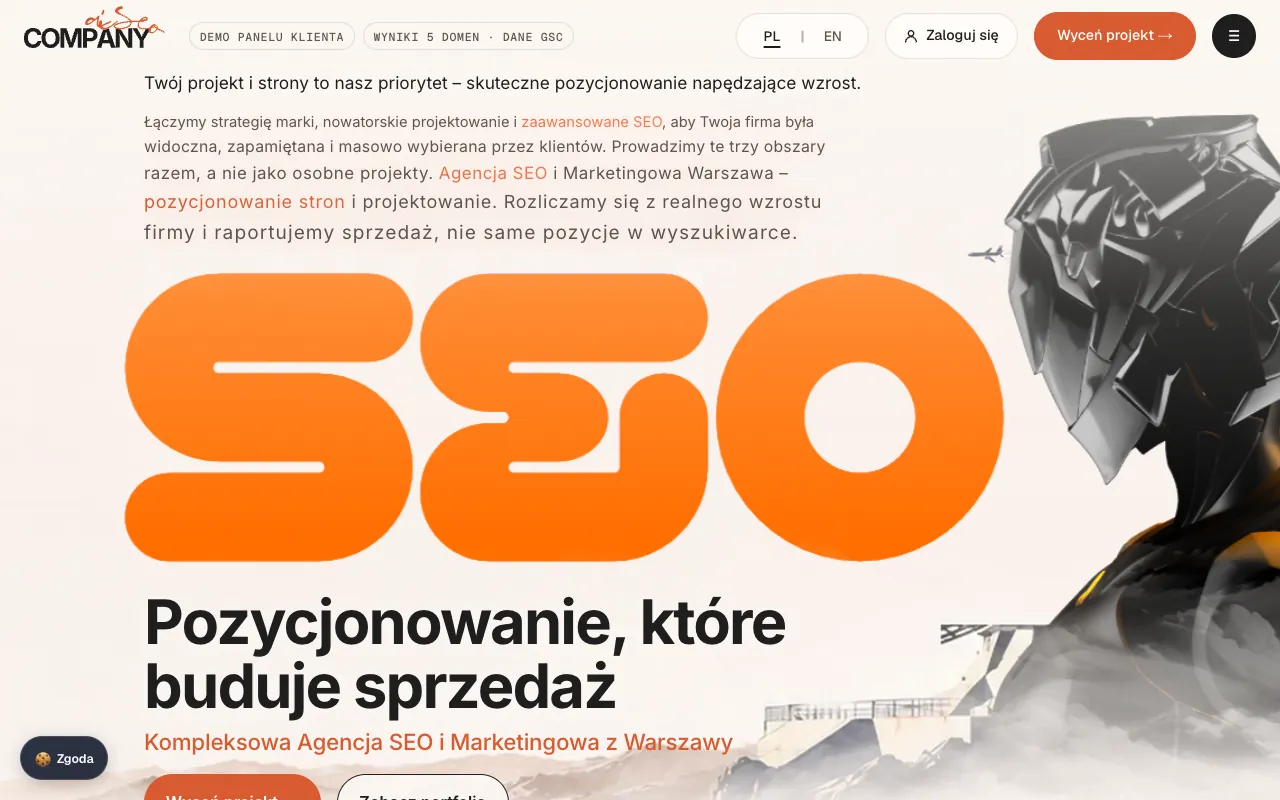
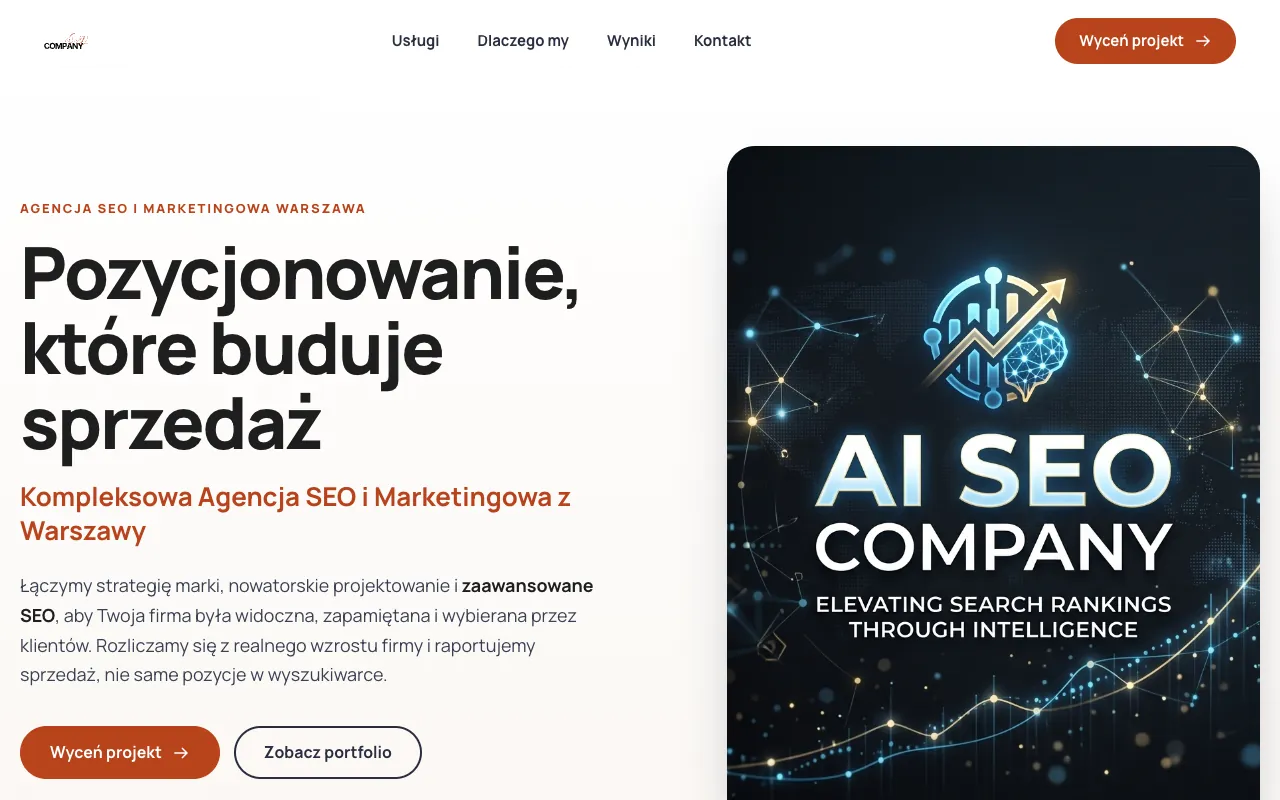
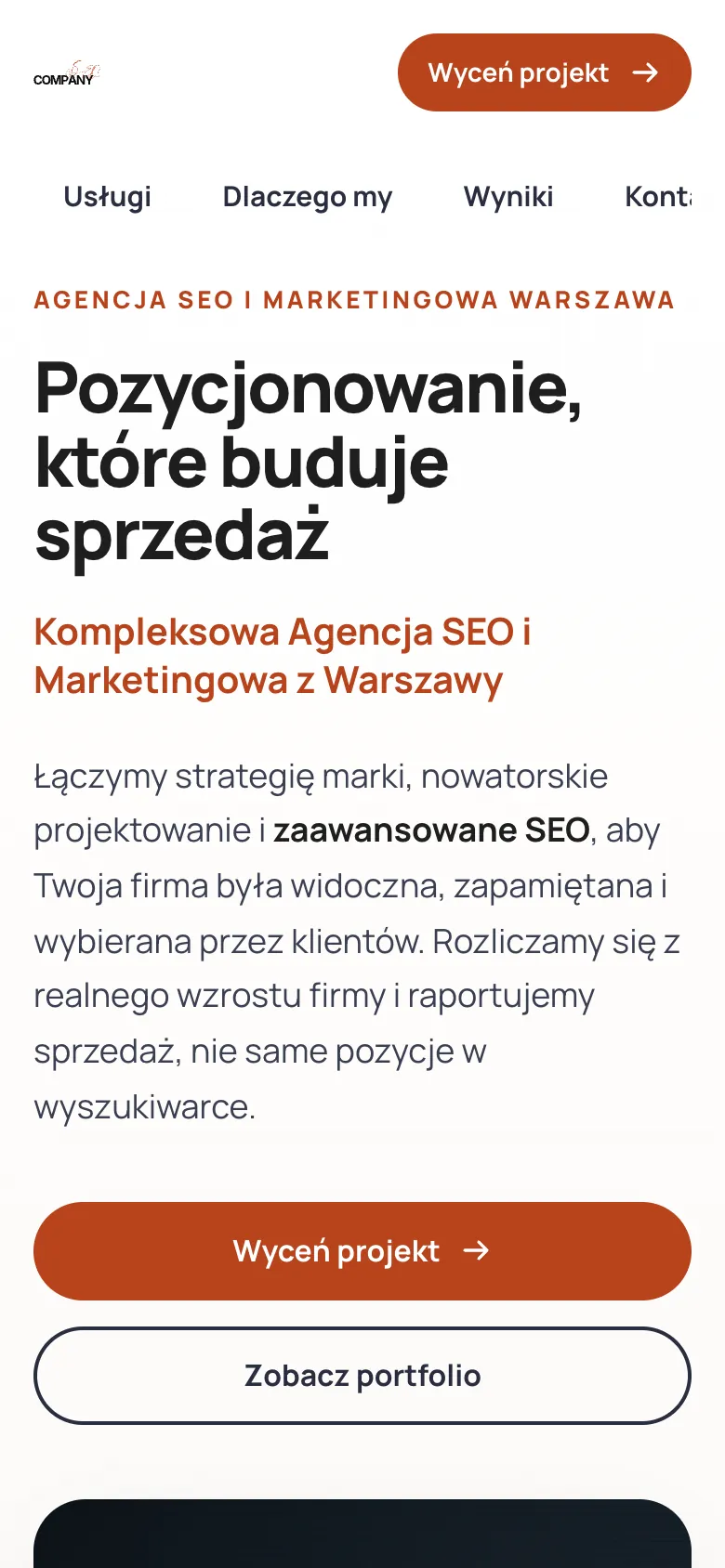
Instead of a made-up company, here is a real result for our own website. On 12 November 2026 we ran the tool on ai-seo-company.pl the way any user would, with nothing typed in the “What should improve?” field. The mockup was ready after about a minute and a half and has 6 sections. Below is its first screen, the part the tool shows right away, before you enter an email. Our homepage is in Polish, so the mockup is in Polish too: the tool keeps the language of the website.
We captured both versions with the same browser at the same screen sizes: 1280 × 800 pixels on desktop and 390 × 844 on mobile. On the current website we clicked “Odrzuć opcjonalne” (Reject optional) in the cookie banner before the screenshot, so it would not cover the content. We did not edit the mockup by hand: it is exactly the code the tool returned.
On desktop
On mobile

Screenshots from 12 November 2026, unedited. We do not show the other 5 sections of the mockup here, because in the tool they are also available only after you enter your email.
What the mockup changed on our website, and what needs fixing
We review the result the same way we suggest you review the mockup of your own website: what is better, and what cannot stay the way it is in the mockup when the site is built.
What is better
- The promise and the buttons are higher up. On desktop, the heading “Pozycjonowanie, które buduje sprzedaż” (SEO that builds sales) and the “Wyceń projekt” (Get a quote) and “Zobacz portfolio” (See the portfolio) buttons fit on the first screen. On the current website the buttons are cut off by the bottom edge of a 1280 × 800 screen.
- The menu is visible right away. Four items (Usługi, Dlaczego my, Wyniki, Kontakt: services, why us, results, contact) instead of a button that opens a full-screen menu.
- The copy is shorter, but nothing was added. The model kept our heading and subheading unchanged and shortened the description from four sentences to two, dropping the word “masowo” (en masse). It added no numbers, reviews or promises that are not on the website.
- The colors stayed ours. Orange (#ef6a1f) and dark graphite (#2a2e40) are the most frequent colors in the code of the current homepage, apart from white.
What needs fixing during the build
- Important header elements are gone. The mockup has no PL/EN language switch, no “Zaloguj się” (Log in) link to the client panel and no shortcuts to the panel demo and the results. The mockup designs a single homepage, so elements like these have to be added by hand.
- The mobile menu is cut off. The items form a row that scrolls sideways, and the fourth one (“Kontakt”) ends at the edge of the screen, so not everyone will notice it can be scrolled.
- The logo is too small. The tool takes the logo from the site icon (favicon), not from the header, and in the mockup it came out noticeably smaller than on the current website.
- The image does not fit a Polish website. The model does not create photos, so on the first screen it used our social sharing graphic, which has English text on it.
- The website lost its character. The large “SEO” graphic and the 3D figure make the current website stand out. The mockup is easier to read, but looks more generic.
Our takeaway: from the mockup we take specific changes to the first screen, that is the buttons higher up and a visible menu, while the brand’s look stays. Read the mockup of your own website the same way: as a list of changes to check, not a design to copy.
How the mockup is made: 3 steps
- We read your homepage. We take your name, headings, menu, service descriptions, contact details and brand colors, and capture a screenshot of the current design.
- AI designs a new layout. The Claude model builds a header with the menu and a first screen, then 4 to 6 sections from your content (e.g. services, why us, process, service area, contact) and a footer, for desktop and mobile.
- You compare. We show the first screen of the new page next to your current one right away. You get the whole mockup and a link valid for 60 days after you enter your email.
The whole process usually takes 1 to 3 minutes. Keep the tab open in the meantime: the progress shows under the button.
Your content, no invented data
The model may shorten and reorganise your copy, but it does not invent numbers, years of experience, customer reviews, awards, certifications, prices, client names or statistics. If something is missing from your website, it leaves that element out instead of making it up. The mockup is a file with no scripts or forms, shown in a sandboxed frame, and we only read your public homepage, the way a browser does.
One limit: if your website shows its text only after JavaScript runs, the model gets less content and the mockup comes out thinner. You can check this in the free SEO audit (the “Content invisible without JavaScript” rule).
How to prepare your website for a better mockup
The model only sees what the tool extracts from the code of your homepage. A few fixes on your current website give a better mockup, and they help with Google and AI answers along the way:
- The H1 heading and the page title say what you do, who for and where. The model gets the title, the meta description and up to 3 H1 headings. In our example it kept the H1 unchanged, so that heading sets the whole first screen.
- Every service has its own H2 heading. The model gets up to 12 H2 headings and builds the next sections from them. Services listed in one long paragraph are easier to lose.
- Your phone number and email address are plain text. The tool looks for them in the page content. A number shown only in an image or hidden in a form will not make it into the contact button of the mockup.
- Your social sharing image (og:image) fits the website. Apart from the logo, it is the only image the model can use. If it is a banner with text in another language or an old offer, it will end up on the first screen, as it did for us.
- Your site icon is a readable mark. The logo in the mockup comes from the site icon (favicon or apple-touch-icon). If the icon is only a symbol, the mockup will show the symbol instead of the full logo.
- Your brand colors are written in the code. The tool takes up to 6 of the most frequent colors from the HTML of your homepage and from the theme-color meta tag. Without them the model picks a calm palette for your industry.
- Your menu has short labels. Up to 8 links to your own pages make it into the mockup, each up to 30 characters long. Longer menu labels are dropped.
- The most important content comes first. The model gets up to 6,000 characters of text from the start of the page, so the description of your offer and service area should come before long SEO texts at the bottom.
When it is worth changing how your website looks
- The site looks bad on a phone or has to be zoomed with your fingers.
- On the first screen a customer cannot see what you do, who for and how to contact you.
- The site loads slowly and an audit shows low mobile performance.
- The look lags behind your competitors and behind how the business works today.
A mockup helps you see a direction before you spend money. The mobile version matters for SEO too: Google evaluates your website mainly in its mobile version.
How to review the mockup: 5 questions
- Does the first screen show what you do, who for and where? If not, that sentence is missing from your current website too: add it before the build starts.
- Are the contact button and phone number visible without scrolling, on mobile too? Switch the preview to mobile and check the first screen.
- Do the sections answer customers’ questions? What you offer, how working together looks, where you operate and how to book.
- What is missing because it is not on your current website? Projects, photos, reviews, prices: the model will not add them, so this is your list of content to prepare.
- Do the colors and typography fit your brand? Note what stays and what should change. That is a ready part of the brief for your developer.
What the mockup will not do
- It designs the homepage only, without the service, contact or blog pages.
- It does not create photos: it uses the logo and the sharing image from your website and replaces the rest with color and simple icons.
- The model gets up to 6,000 characters of text from your homepage. Longer text is cut off, so content from the lower part of the page may not make it in.
- It is a static HTML file: no editor and no export to WordPress or Figma. Changes are made during the build.
- The mockup is written in the language of your website. Every run gives a slightly different proposal; the limit is 2 mockups per day from one IP address.
- The screenshot of your current website comes from an external service. If it does not respond, the model works from your content only and you will not see a side-by-side comparison.
AI mockup vs a designer’s project
- Time: the mockup is ready in 1 to 3 minutes. A designer’s project needs a brief, a conversation and a few rounds of changes.
- Content: the mockup uses only what is already on your website. A designer can propose new copy, photos and a new page structure.
- Scope: the mockup is one homepage. A project also covers the subpages, reusable components and brand design rules.
- When to use which: the mockup helps you decide whether and in which direction to change the design. A project is what you need once that decision is made.
What to do with the mockup next
- Build it with us: we build a Next.js company website from €1,400 net, with SEO, speed and redirects from your old URLs. You get a quote within 24 hours on business days. See how we approach web design.
- Build it with someone else: the link in the email works for 60 days, so you can show the mockup to a developer or an agency.
- Use it as a direction: treat the mockup as the starting point of a website brief: note which sections stay, what is missing and which photos you need.
Sources
- Google Search Central: Site moves with URL changes (301 redirects when URLs change) (accessed November 12, 2026)
- Google Search Central: Mobile-first indexing best practices (Google uses the mobile version) (accessed November 12, 2026)
- W3C: WCAG 2.2, success criterion 1.4.3 Contrast (Minimum), the 4.5:1 threshold (accessed November 12, 2026)
Guides for this tool
- How much does a business website cost? Pricing: what drives the price of building the mockup
- Website UX Audit for Conversion: A Practical Guide: what to fix before you change the design
- Website brief template with an SEO section: a faster quote for a new website
More free tools
- Free SEO audita 1-100 score and a list of errors for up to 25 pages
- AI visibility checkwhether ChatGPT, Gemini, Perplexity, Claude and Google AI Overviews name your business
- SEO loss calculatorthe monthly profit you lose without a Google top 3 position and AI recommendations
- llms.txt generatoran llms.txt file from your sitemap and an access test for 8 AI bots
- Domain authority checkera 0-100 score from the Common Crawl link graph, compared with up to 3 competitors
- All free tools and templatesthe full list, with SEO templates to download
Questions about the redesign mockup
We fetch your homepage, extract its content (name, headings, menu, service descriptions, contact details and colors) and take a screenshot of how it looks now. The Claude AI model designs a new homepage layout from that. It does not invent numbers, reviews, awards or prices: it only uses content from your website.
The mockup is a proposal for the look, not a finished website. It shows a direction: the section layout, hierarchy and colors. Before launch it has to be adapted to your brand and photos, and you need to take care of SEO: URLs, headings, speed and structured data.
No. We only read the public homepage, the way a browser does. The mockup is a separate file with no scripts, shown in a sandboxed frame, and the full version is available through the link in the email for 60 days.
The mockup itself changes nothing on your website. The risk comes when you launch the new design: changed URLs, removed content and slower loading. That is why the build has to keep your URLs or set up 301 redirects, carry over the content and check the speed before the new site replaces the old one.
The model shortens and reorganises the copy from your website, but it does not add numbers, reviews, awards, prices or client names. It is still worth reviewing the copy before launch, because the mockup shows a direction, not finished content.
No. You see the first screen of the mockup without signing up. For the whole mockup you only need an email address, to which we send the link. The limit is 2 mockups per day from one IP address.
The same language as your website: a Polish website gets a Polish mockup and an English website an English one.
It depends on the number of pages, integrations and content. We build a Next.js company website from €1,400 net and prepare a quote within 24 hours on business days. The scope is described on our web design page.