Google Business Profile optimization (Google Maps SEO)
Short answer
Google Business Profile optimization is the work of making your profile show up in Google Maps and the local pack when nearby customers search for your service. Google judges a profile on relevance, distance from the searcher and prominence of the business. We measure your ranking from 49 points around your address, because a customer at the other end of the district sees a different ranking than you do.
We manage your profile together with your website in the SEO Standard package from €450 net per month, on a monthly contract. You follow progress in the client portal and see every action in the work log.
What decides your Business Profile’s position in Google Maps
In Google Maps and the local pack, the block of businesses with a map above the organic results, Google shows the profiles that best match the query and the place where the searcher is. Google Business Profile Help lists three main factors: relevance, distance and prominence. Google also notes that you cannot ask for, or pay for, a higher local ranking. Optimizing for Google Maps is therefore work on these three factors, not the purchase of a position.
Relevance: primary category, services and description
Relevance describes how closely a profile matches the search term. According to Google, complete and detailed business information helps here. The single biggest lever is the primary category, because it tells Google what the business mainly does. Secondary categories describe the rest of your offer, and a list of services with short descriptions catches queries that no category covers. We write the business description for the customer: what you do, for whom and in which area.
Adding keywords to your business name is a risk not worth taking. Google’s guidelines prohibit unnecessary information in the name and state plainly that it can lead to a profile suspension. The name in your profile should match the one on your sign and in your company documents.
Distance: what you cannot change and how to work with it
Distance is the gap between the business and the searcher. If the customer does not share their location, Google uses other available information about where they are. You cannot optimize this factor: a business usually ranks higher in its own district than at the other end of the city. What you can do is measure how far from your address your visibility reaches and widen that reach through prominence. Businesses that travel to customers show a service area instead of an address. How the ranking is calculated in that case is explained in the question about a business without a storefront.
Prominence: reviews, mentions and your website
Prominence describes how well known the business is. Google’s help pages say it depends, among other things, on the number of websites linking to the business and on the number of reviews: the more there are and the better they are, the higher the likely ranking. That is why we work on three things at once: a steady flow of genuine reviews, mentions in directories and local media, and the company website those mentions point to.
Google also lists replying to reviews as a way for a business to stand out from the competition. How to ask a customer for a review and how to answer critical ones is covered in our guide on how to get Google reviews.
How we measure your ranking: the 7×7 grid
When you check your profile from the office or your own phone, you see the ranking for a single point on the map. A customer a few kilometers away sees a different list, because Google calculates distance from them, not from you. A single check therefore misleads in both directions: your profile can be first at your own address and invisible a few blocks away.
That is why we measure from 49 points. We lay a 7-by-7 grid of points around your business address and, at each one, check where your profile ranks in Maps for the agreed keyword. We run the first scan before any changes to the profile and further scans every 14 days, and the result goes to the client portal as a grid of colored points.
How to read the result: the number in a point is your profile’s position, and a green point means TOP 3, that is, a place in the local pack. The key metric is the share of points in the TOP 3; the second is the average position where the profile is visible. Two consecutive scans show whether your reach is growing and in which direction.
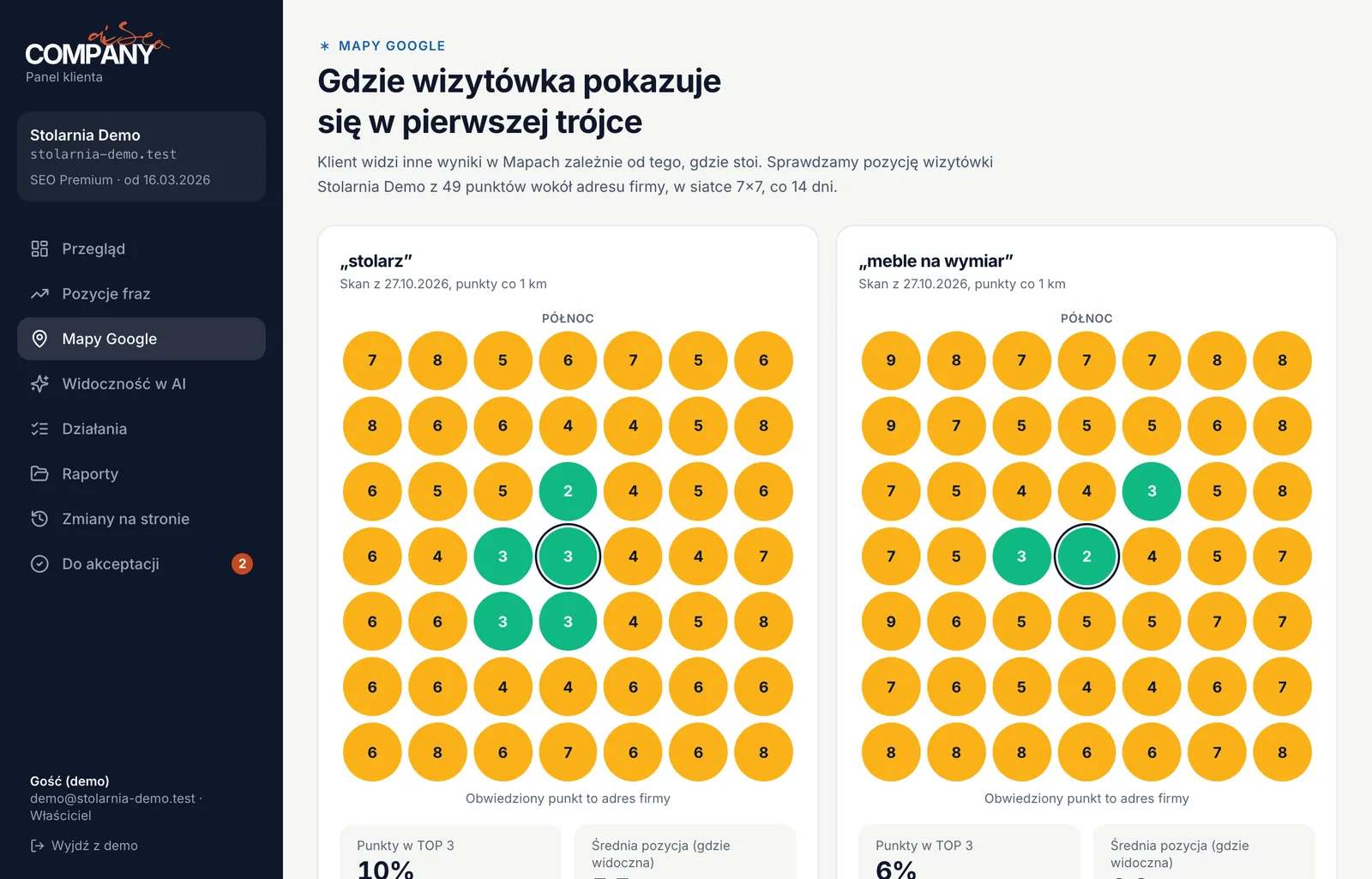
In the screenshot, for the keyword “stolarz” (carpenter), Stolarnia Demo is in the TOP 3 at 5 of 49 points (10%), all of them right next to the business address, and ranks between 4th and 8th at the remaining points. That picture says the profile is relevant, but its reach needs to be widened through prominence: reviews, mentions and links.
What else the 49-point measurement in the client portal shows is described on a separate page. You can also see the grid in the demo portal (in Polish) without logging in.
Business Profile optimization and monthly management
Optimizing a Google Business Profile means getting the profile in order at the start. Managing it is ongoing work, because reviews, photos and posts go stale and your competitors maintain their profiles too. Google Business Profile is the former Google My Business, so optimizing a Google My Business listing means exactly the same service. The package covers both.
At the start: profile optimization
- We check that the profile is verified and belongs to your company’s account. We get manager access, which you can revoke at any time.
- We choose the primary and secondary categories to match the queries your customers type, and compare them with the categories of businesses in the local pack.
- We fill in services with descriptions, opening hours (including holidays), attributes, the service area and a link to the right page.
- We make the name, address and phone number (NAP) consistent in the profile, on your website and in directories.
- We run the first 7×7 grid scan so there is a baseline to compare later scans against.
Every month: managing your Business Profile
- Posts at least twice a month: completed jobs, new services, seasonal offers.
- New photos of completed jobs, the team and the premises, no stock photos.
- Review requests after each job with a direct link, to send by email or text message.
- A reply to every review within 48 hours, including critical ones.
- Listings in industry directories and local links: media, organizations, partners.
- A grid scan every 14 days and a report in the portal: what we did and how your ranking changed.
Every action goes into the work log in the portal with a date and the number of hours, so you can see what you are paying for.
How much Google Business Profile optimization costs
Agencies and freelancers usually manage a profile on its own for PLN 100–600 per month, and from PLN 800 in competitive industries. Our SEO Standard package costs from €450 net per month, because besides the profile it covers website optimization, up to 20 keywords, 2 pieces of content and 2 links per month, plus Maps ranking measurement from 49 points every 14 days. The contract is monthly.
Market ranges: guide on dawidgicala.pl, checked on November 5, 2026
Perplexity, asked on November 4, 2026 who optimizes Google Business Profiles in Warsaw and what it costs, divides the market in a similar way. According to that answer, simple management of the profile alone costs around PLN 250–600 net per month, while local SEO covering the profile, website, reviews and links usually costs PLN 1,000–2,500 net per month. Our package falls in the second range.
| Scope | Profile only (typical on the market) | SEO Standard from €450 net/mo. |
|---|---|---|
| Categories, services, description and opening hours | yes | yes |
| Posts and photos | usually yes | yes |
| Review replies and a review collection process | varies | yes |
| Your website: service pages, content, links | no | yes, up to 20 keywords, 2 pieces of content and 2 links per month |
| Map ranking measurement | varies | 49 points every 14 days in the client portal |
| Reporting | varies | client portal 24/7 and a monthly report |
| Contract | varies | monthly, cancel at any time |
The “profile only” column describes the typical scope of offers for managing the profile alone, not specific companies; “varies” means it depends on the offer.
The Google Business Profile itself is free: you pay for the work, not for a place in Maps (details in the question is a Google Business Profile free). You can compare the full scope of the SEO Standard and SEO Premium packages on the SEO pricing page.
Business Profile and ChatGPT: recommendations lead to Google Maps
We checked where the links go when ChatGPT recommends a business. On November 4–5, 2026 we asked it 10 requests to recommend a business, including a carpenter, a plumber, an accounting firm and an SEO agency in Warsaw, Kraków and Poznań, plus questions about prices, rankings and service features.
| Type of question | Links in answers | Of which to Google Maps |
|---|---|---|
| Request to recommend a business (11 answers to 10 questions) | 62 | 59 |
| Question about price, ranking or a service feature (5 answers) | 31 | 0 (cited websites) |
Method: gpt-4.1-mini with web search via the DataForSEO API, search location Warsaw (also for the Kraków and Poznań questions), 1 answer per question, Nov 4–5, 2026. Links to Maps are Google Maps search URLs (google.com/maps/search). The ChatGPT app may answer differently.
When it recommends a business, ChatGPT gives the address and opening hours, and the link leads to Google Maps, where the customer sees the Business Profile. In the two questions about who optimizes Google Business Profiles in Warsaw, 9 of 10 links led to Maps. The measurement shows where the links lead, not where the model gets its knowledge, so we do not claim that Maps is its only source. The practical conclusion is simpler: a well-kept profile answers the request “recommend”, and a website with a clear price answers the question “how much”.
That is where we start with ChatGPT optimization: a Business Profile and a website with a clear offer and price.
How to optimize your Google Business Profile yourself: 8 steps
If you want to optimize your Google Business Profile yourself, start with these eight steps. You do the first four once and fix them when something changes in your business. The other four take regularity over many months.
- Verify your profile and keep it under your company account. Google says a verified business is more likely to appear in results. The profile owner should be your company's Google account; give an agency or freelancer manager access, which you can revoke at any time.
- Choose a primary category. Check which categories the businesses in the local pack use for your most important service and pick the one that describes it most precisely. Add secondary categories only for services you actually provide.
- Fill in services and the description. List every service with a short description: what you do, for whom and where. Write the business description for the customer, not as a list of keywords, and keep the name exactly as it appears on your sign.
- Enter your real opening hours. Set holiday hours too and update them in advance. A customer who arrives at a closed door may leave a review you do not want.
- Add your own photos. Completed jobs, the team, the premises and the street entrance. Stock photos say nothing about your business, and new photos every month show that the profile is actively managed.
- Publish posts. At least twice a month: a new service, a completed job, a seasonal offer or a change in hours. Each post should link to the right page.
- Collect reviews and reply to every one. Ask for a review after every job by sending a direct link by email or text message. Reply within 48 hours, including to critical reviews. Do not pay for reviews or offer discounts for them: Google's policies prohibit it.
- Make your business details consistent across the web. Name, address and phone number (NAP) should be identical in your profile, on your website and in industry directories. Different versions of an address make it harder to connect mentions with your business.
When should you hand over profile management? When steps 5–8 lose out to everyday work, when your ranking stands still despite a complete profile, or when you do not know whether changes work beyond your own street because you have no measurement from many points.
Business Profile and website: why you need both
Your profile answers queries in Maps and the local pack. Your website works in the organic results below the map and answers questions about price and scope of services, and for questions about prices ChatGPT cites websites. The two reinforce each other: the link in the profile takes the customer to the right page, and Google lists the number of websites linking to a business among its prominence signals.
That is why in the SEO Standard package we manage the profile together with the website. How this works for businesses operating in a single city is shown on the local SEO in Warsaw page, and how we work on the website itself is described in the business website SEO service. An example of a local business from our practice is the Madame Thai case in our roundup of SEO results (available in Polish).
Sources
- Google Business Profile Help: Improve your local ranking on Google (accessed November 5, 2026)
- Google Business Profile Help: Guidelines for representing your business on Google (accessed November 5, 2026)
- Google Maps Help: Prohibited and restricted content (fake engagement) (accessed November 5, 2026)
- Google Business Profile Help: Business Profile suspensions and restrictions for policy violations (accessed November 5, 2026)
Questions about Google Business Profile optimization
No. You create and run a Google Business Profile for free, and Google does not sell higher positions in the free Maps results. Only ads labeled as sponsored are paid. When you pay for Business Profile optimization, you pay for work: categories and services, photos, posts, replies to reviews and ranking measurement.
Relevance works fastest: the right primary category, secondary categories, a full list of services with descriptions and real opening hours. Then prominence: a steady flow of reviews answered within 48 hours, posts at least twice a month, new photos and the same business details across directories. You cannot change the distance from the customer.
Google usually picks up changes to categories and services within a few weeks, which is why we run the first grid measurement before the changes and the next ones every 14 days. Reviews and mentions build your ranking over months. For the agreed local keywords, the goal is TOP 3 within 2–3 months.
Yes. A business that travels to its customers hides its address and sets a service area. Its position in Maps still depends on the distance from the address given at verification, so we measure it with a grid around that point and strengthen reach beyond it with a page describing the service area.
You should not, and you may not. Google’s policies prohibit fake reviews and rewarding customers for leaving them, and violations end with reviews being removed and the profile being restricted. What works is a process: a review request after every job with a direct link, and a reply to every review. We describe it in our guide to Google reviews.
Business Profile optimization concerns your profile in Maps and in the local pack. Website SEO concerns the organic results below the map: service pages, content, structured data and links. A business that has both usually beats one that only has a profile, because the website strengthens the profile’s prominence.
Want more customers nearby to find you in Maps? Tell us what you do and where, and we will reply within 24 hours on business days.
Ask about the package with profile management