SEO audit example: a real report for our own website, score 95/100
Prepared by: Filip Śliwa, SEO specialist · updated:
Short answer
This SEO audit example is a real report, not a mock-up. On 18 November 2026 our free SEO audit checked 25 pages of ai-seo-company.pl against 49 rules and scored it 95 out of 100: 0 errors and 3 warnings, all about mobile speed. Below are every number, each issue with its fix, and the format a report should follow.
www.ai-seo-company.pl · 18 November 2026, 23:12 (Warsaw time)
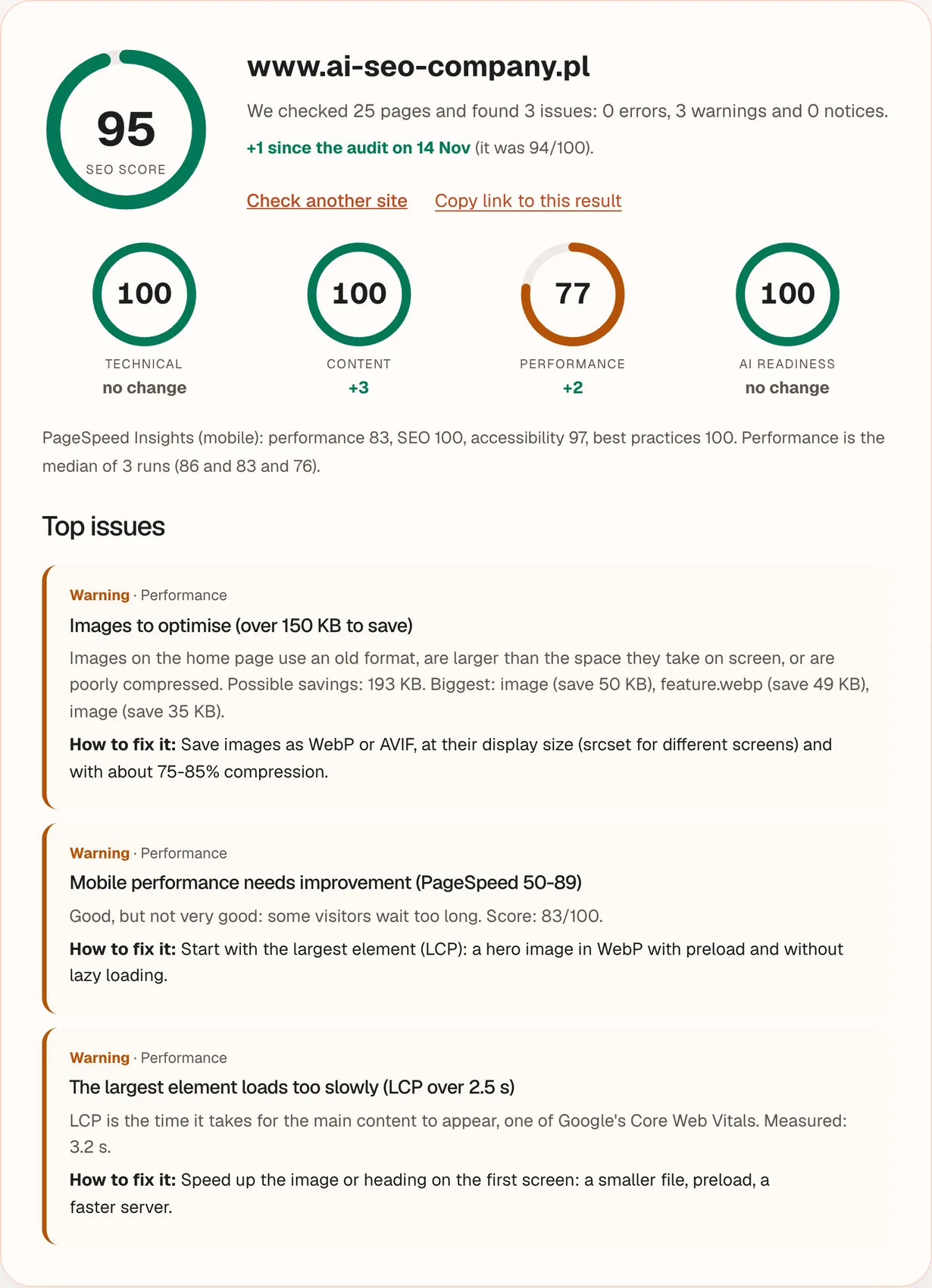
95
SEO score out of 10025 pages, 49 rules: 0 errors, 3 warnings, 0 notices.
Technical SEO100
Content100
Performance77
AI readiness100
The report at a glance
We ran our free SEO audit once on our own domain, on 18 November 2026, 23:12 (Warsaw time), the way any visitor does it: no account and no e-mail. Every number below is copied from the tool’s response, including the ones that do not flatter us.
The audit of www.ai-seo-company.pl in numbers
Item
Result
Domain audited
www.ai-seo-company.pl
Run
18 November 2026, 23:12 (Warsaw time), result after about 26 seconds
Pages checked
25
Rules applied
49
SEO score
95 out of 100
Issues found
3: 0 errors, 3 warnings, 0 notices
Previous audit of this domain
94 out of 100 on 14 November 2026 (+1 now)
PageSpeed Insights (mobile)
performance 83, SEO 100, accessibility 97, best practices 100
The report as our free audit tool displays it, rendered from the saved result of the 18 November 2026 run for www.ai-seo-company.pl, without the site header. It is the part a visitor sees without giving an e-mail. Here that is the whole list, because the audit found only three issues. When it finds more, the first three are shown and the rest, with the affected page URLs and an e-mailed report, are unlocked with an e-mail address.
Scores by category
The audit sorts its 49 rules into four categories and weights them: technical SEO 35%, content 30%, performance 20% and AI readiness 15%. Three categories scored 100. Performance scored 77, and that is the whole gap to a perfect score.
Category scores in the audit of 18 November 2026
Category
Weight
Rules
Score
Against 14 Nov
Issues
Technical SEO
35%
21
100
no change
none
Content
30%
12
100
+3
none
Performance
20%
10
77
+2
3 warnings
AI readiness
15%
6
100
no change
none
Weights and rule counts: the free SEO audit’s scoring, as described on its page.
The arithmetic is open. Overall: 0.35 × 100 + 0.30 × 100 + 0.20 × 77 + 0.15 × 100 = 95.4, shown as 95. Performance is 70% the mobile PageSpeed score (83) and 30% the rules. Each of the three warnings costs 12 points of the rules part (4 points × a multiplier of 3), so the rules part is 64, and 0.7 × 83 + 0.3 × 64 = 77.3, shown as 77.
The three issues and how to fix them
The audit reported no errors and no notices. All three warnings are about the speed of the home page on a phone, and they are connected: heavy images slow the largest element, and the largest element drags down the PageSpeed score. For each issue we show what the rule checks, what was measured and the fix the tool gives.
Warning · Performance
Images to optimise (over 150 KB to save)
What the rule checks
Whether the images on the home page could be much smaller. The rule reports a problem when PageSpeed Insights estimates more than 150 KB of possible savings, because old formats, files larger than the space they fill and weak compression all slow the first screen down.
What we measured
Possible savings: 193 KB. The three biggest single savings: 50 KB, 49 KB (feature.webp), 35 KB. A file that is already WebP, like feature.webp, can still be flagged when it is larger than its slot or compressed too lightly.
How to fix it
Save images as WebP or AVIF, at their display size (srcset for different screens) and with about 75-85% compression.
Warning · Performance
Mobile performance needs improvement (PageSpeed 50-89)
What the rule checks
The mobile performance score from PageSpeed Insights. Lighthouse calls 50 to 89 “Needs Improvement” and 90 to 100 “Good”.
What we measured
83 out of 100: the median of three runs (86, 83, 76). The runs differ by 10 points, which is why the audit takes three and does not trust a single one.
How to fix it
Start with the largest element (LCP): a hero image in WebP with preload and without lazy loading.
Warning · Performance
The largest element loads too slowly (LCP over 2.5 s)
What the rule checks
Largest Contentful Paint, the time it takes for the main content to appear and one of Google’s Core Web Vitals. Google treats 2.5 seconds or less as good and more than 4 seconds as poor, measured at the 75th percentile of page loads.
What we measured
3.2 s in this run, so in the “needs improvement” band between 2.5 and 4 seconds. Google applies its thresholds to many page loads, so one measurement is a pointer, not a verdict.
How to fix it
Speed up the image or heading on the first screen: a smaller file, preload, a faster server.
LCP is one of Google’s Core Web Vitals, so the third issue is the one to check against Google’s own thresholds first. Our guide to Core Web Vitals and Google rankings explains the thresholds in detail.
Rules passed and failed, by category
In this run 3 of 49 rules reported a problem, all in performance. The other 46 reported nothing: their check passed or did not apply to this site. Open a group to see its rules, grouped as the tool groups them.
Technical: 21 rulesall 21 reported nothing
Pages return an error (4xx/5xx)Error, 10 pts
Redirect chainsWarning, 3 pts
The site does not run on HTTPSError, 10 pts
The http:// version does not redirect to https://Warning, 4 pts
The www and non-www versions do not lead to a single addressWarning, 3 pts
No robots.txt fileNotice, 1 pt
robots.txt blocks the entire siteError, 15 pts
No sitemap (sitemap.xml)Warning, 4 pts
No canonical URLWarning, 3 pts
Pages excluded from the index (noindex)Notice, 2 pts
Home page excluded from the index (noindex)Error, 15 pts
The sitemap lists URLs that should not be indexedWarning, 3 pts
Missing lang attribute in <html>Warning, 2 pts
The page is not mobile-friendly (no meta viewport)Error, 6 pts
Resources loaded over http:// on an https:// pageWarning, 2 pts
Non-existent addresses return a page with code 200 (soft 404)Error, 5 pts
Language versions without hreflang tagsWarning, 4 pts
Errors in hreflang tagsWarning, 3 pts
Pages without hreflang on a multilingual siteNotice, 1 pt
Broken internal linksError, 6 pts
Broken external linksNotice, 1 pt
Content: 12 rulesall 12 reported nothing
Missing page title (title)Error, 8 pts
Title too long (over 60 characters)Warning, 2 pts
Title too short (under 20 characters)Notice, 1 pt
Duplicate titles across several pagesWarning, 4 pts
Missing meta descriptionWarning, 3 pts
Meta description too long (over 160 characters)Notice, 1 pt
Duplicate meta descriptionsNotice, 2 pts
Missing H1 headingError, 6 pts
Several H1 headings on the pageNotice, 1 pt
Little text in the HTML (under 250 words)Warning, 4 pts
Images without alternative text (alt)Warning, 2 pts
No Open Graph tagsNotice, 1 pt
Performance: 10 rules3 reported a problem, 7 nothing
Very heavy home page (over 5 MB)Error, 6 pts
Heavy home page (over 3 MB)Warning, 3 pts
Images to optimise (over 150 KB to save)Warning, 4 pts, reported a problem
Images without dimensions (width and height)Notice, 2 pts
Slow server response (over 1.5 s)Warning, 4 pts
Large HTML document (over 500 KB)Notice, 2 pts
Low mobile performance (PageSpeed below 50)Error, 8 pts
Mobile performance needs improvement (PageSpeed 50-89)Warning, 4 pts, reported a problem
The largest element loads too slowly (LCP over 2.5 s)Warning, 4 pts, reported a problem
Elements jump around while loading (CLS over 0.1)Warning, 3 pts
AI readiness: 6 rulesall 6 reported nothing
Content invisible without JavaScript (under 50 words in the HTML)Error, 8 pts
robots.txt blocks AI botsWarning, 8 pts
No company structured data (Organization / LocalBusiness)Warning, 5 pts
Invalid structured data (JSON-LD)Warning, 3 pts
llms.txt file without links to pagesWarning, 2 pts
No llms.txt fileNotice, 1 pt
SEO audit format: what a report should contain
A good audit report lets someone who was not in the room decide what to do next. If you are writing an audit yourself, this is the SEO audit format we follow, and the right-hand column shows how this example fares. Use our SEO checklist template for the checks you fill it with, or the technical SEO audit checklist for the technical part.
The parts of an SEO audit report and how this example covers them
Part of the report
What it should contain
In this example
Summary and score
One overall number, a score per category and the count of issues by severity.
The domain, the date, how many pages were checked and which tools and data sources were used, so a reader knows what the result covers.
Yes: 25 pages, 49 rules, our AISEOCompanyAudit crawler and Google PageSpeed Insights, date and time of the run.
Findings by severity
Errors first, then warnings, then notices, each with a plain-language title.
Yes: three warnings, no errors, no notices.
Evidence
The measured value or the affected URLs behind each finding.
Measured values (193 KB, 83/100, 3.2 s). Affected URLs: not applicable, because all three rules concern the home page as a whole.
Fix instructions
What to change, in words a developer can act on.
Yes: one instruction per issue.
Priorities
The order of work, with the biggest effect first.
Severity decides the order. With only warnings, start with the one that moves the score most: mobile performance.
Change since the last audit
A comparison with the previous run, overall and per category.
Yes: +1 against 14 November 2026 (94/100), with a change per category.
Limits
What the audit did not check, stated plainly.
Yes: see “What an automated audit cannot do” below.
How to read a report like this
Read the category scores before the total. A 95 hides a 77. The total is a weighted average, so one weak category is softened by three strong ones. Here the only category below 100 is performance.
Separate errors, warnings and notices. In this tool an error rule is worth 5 to 15 points, a warning 2 to 8 and a notice 1 or 2, before a multiplier of 3. One failed error rule can cost a category up to 45 points, which is why errors come first.
Check whether a problem is site-wide or per page. A site-wide rule, such as the three above, costs its full penalty. For a per-page rule, one affected page already costs 40% of the penalty, and the cost grows with the share of pages affected.
Compare measured values with Google’s thresholds. An LCP of 3.2 s is not good against Google’s 2.5 s, and a PageSpeed score of 83 is in the “Needs Improvement” band, below the 90 that Lighthouse calls “Good”.
Compare with the previous audit and allow for noise. The score moved from 94 to 95 in four days. Speed measurements vary between runs (86, 83 and 76 here), so treat a change of a few points in performance as noise unless it repeats.
Fix in order, then run the audit again. Fix errors first, then the warnings with the biggest effect, then run the audit again to confirm the change in the score.
What an automated audit cannot do
The free audit is fast and consistent, and that comes with limits. These are the ones that matter when you read the score of 95 above.
It checks a sample of up to 25 pages: the home page, the links on it and URLs from the sitemap. On a large website most pages stay outside the audit.
It measures speed in PageSpeed Insights on mobile, for the home page only. Other templates, such as long articles or product pages, can behave differently.
It reads the HTML as the server sends it, without running JavaScript, the way most AI bots do. Content added by scripts may be invisible to it.
It looks for duplicate titles and descriptions only among the pages it checked, and it checks external links only for 404 and 410 codes.
It does not check links pointing to your site, keywords, Google rankings or Search Console data.
It cannot judge whether a page answers what a searcher wants, whether the content is accurate and useful, or how you compare with named competitors. A person has to read the pages for that.
A manual audit covers the whole website and adds keywords, competitors, the link profile and Search Console data, with a plan of changes. Our SEO audit service does that, starts from €350 net and takes 3 to 5 business days; the current prices of all packages are on the SEO pricing page.
See your own report
Enter your website address and get the same kind of report in 20 to 90 seconds: a 1-100 score, four category scores and the top issues with fixes. No sign-up; up to 5 audits per day from one IP address.
A summary with a score, the scope and method, findings ordered by severity, the evidence behind each finding, fix instructions, priorities, a comparison with the previous audit and the limits of the check. The table above shows each part in this real report.
Yes. It is the result of one run of our free SEO audit on our own website on 18 November 2026, 23:12 Warsaw time. The numbers are copied from the tool’s response, including the three warnings and the 77 in performance. You can run the same audit on your site and compare.
In this tool, 80 or more means the basics are fine and it is worth turning to content and links. From 50 to 79 there are problems that limit visibility, so start with errors, then warnings. Below 50 there are technical gaps that can stop Google from indexing the site. Scores from other tools use other formulas and are not comparable.
No. It means that 46 of 49 automated rules reported nothing on the 25 pages checked. The audit does not look at backlinks, rankings, search intent or content quality, and our own report still has three performance warnings to fix.
This page is not a download: it shows a finished report and the format a report should follow. For the checks to fill it with, use our SEO checklist template, a free PDF with 50 points.